A ROAS banding playbook for Amazon Ads.
How I turned a 600-campaign Amazon Ads account into five ROAS bands, an age gate and a negatives-first rollout that anyone on the team can apply.
Matías Gaglio ·
Leer en español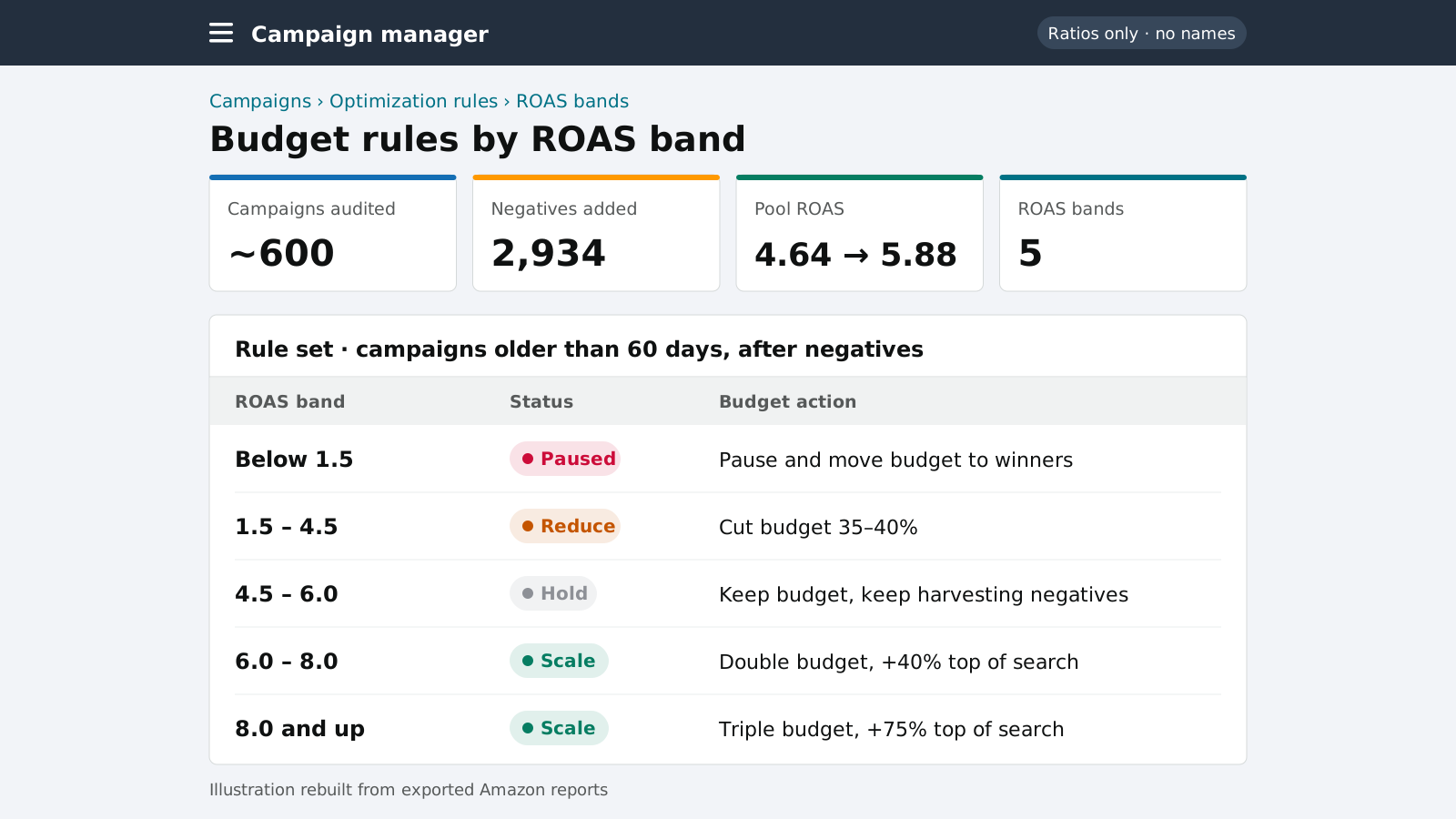
Six hundred campaigns don't fit in anyone's head.
At Revolution Supply I manage the Amazon channel for wheel accessories: lug nuts, wheel spacers, lug bolts and related parts. The ad account grew one launch at a time until it held roughly 600 Sponsored Products, Sponsored Brands and Sponsored Display campaigns. At that size, reviewing campaigns one by one gives you opinions, not decisions. Two people looking at the same campaign can reach opposite conclusions, and a busy week quietly turns into "leave everything as it is".
The goal was to grow sales toward a daily floor while lifting blended ROAS to 6.0 or more, without losing more than 10% of ad-attributed sales. To do that I needed rules that anyone on the team could apply to the whole account and get the same answer.
Age first, then ROAS, then budget.
Age filter
Campaigns under 30 days are never paused. Under 60 days they count as active tests and are left alone unless someone asks for an exception.
Clean the data
Negative keywords and negative product targets go in first, so each campaign is judged on the traffic it is meant to buy.
Assign a band
Post-negative ROAS for campaigns 60+ days old decides whether the campaign is paused, cut, held or scaled.
Then budget
Budget and top-of-search modifiers follow the band, inside the account caps and separate pools such as Canada.
Five bands, one action each.
The thresholds sit around the account's real economics. A campaign below 1.5 ROAS loses money on almost any lug nut or spacer margin, while above 6.0 there is room to buy more of the same traffic.
| Post-negative ROAS (60+ days) | Action | Top-of-search modifier |
|---|---|---|
| Below 1.5 | Pause | None |
| 1.5 to 4.5 | Cut budget 35 to 40% | None |
| 4.5 to 6.0 | Hold | None |
| 6.0 to 8.0 | Scale budget 2x | +40% |
| 8.0 and above | Scale budget 3x | +75% |
Exceptions are written down rather than improvised: a segment's main campaign isn't paused even when it lags, Sponsored Brands get the full 30-day protection, Canada is its own budget pool, and a few campaigns carry explicit daily caps agreed with management.
The biggest lever didn't cost a dollar.
Before any budget moved, I worked through six Amazon Ads reports to build negatives. The first pass produced 1,116 negative keywords and product targets. A second pass, which also covered Sponsored Brands, produced another 1,818.
Re-scoring the campaign pool after the first pass, without the wasted terms, moved its projected ROAS from 4.64 to 5.88 at the same spend. Many campaigns that looked like candidates for a cut were fine products buying the wrong searches. Without negatives first, the banding would have cut them.
Reading it honestly
5.88 is a projection: the same traffic minus the terms that didn't convert. Removing those terms also removes some clicks that may have helped later, so I treat the projection as the ceiling and track the real result month by month.
1,116 negatives
Search terms with spend and no orders, plus irrelevant vehicle and product queries.
1,818 more
Extended to Sponsored Brands, where non-converting broad traffic was concentrated.
4.64 → 5.88 ROAS
Projected pool ROAS with no change in budget.
Three weeks, three bulksheets.
Negatives and pauses
1,021 of 1,031 bulksheet rows landed on the first upload. The rest were fixed individually.
Cut-backs and harvests
Budget cuts for the middle band, plus 14 new campaigns built from search terms with high ROAS.
Scale-ups
2x and 3x budgets with +40% and +75% top-of-search modifiers. This step depends on raising the account's daily cap.
Bulk operations are fast, but they fail silently in small ways, so each file now passes a checklist before upload:
- Every tab starts with Product, Entity and Operation, with no notes tabs.
- Start dates are never in the past, which is a common reason a whole file is rejected.
- Sponsored Brands and Sponsored Products go in separate files.
- Campaign IDs are checked against the search term report, because spreadsheet exports can corrupt long IDs.
- No forward slashes in keywords, and Sponsored Display product targets use the
asin="…"expression.
Efficiency up. Sales growth still pending.
October was the account's most efficient ad month since March, at 4.87 ROAS on lower spend than September, with no drop in sales. Total sales, though, have stayed close to their pre-audit level. The rules made spend more efficient, but they didn't add demand on their own.
The same data showed why. Traffic rose about 11% while conversion fell every month. A banding system decides where the next dollar of ads goes. It can't fix a listing that converts worse than it used to, so the next phase looks at price, Buy Box, stock and content on the top sellers before buying more traffic.